The Spending Page
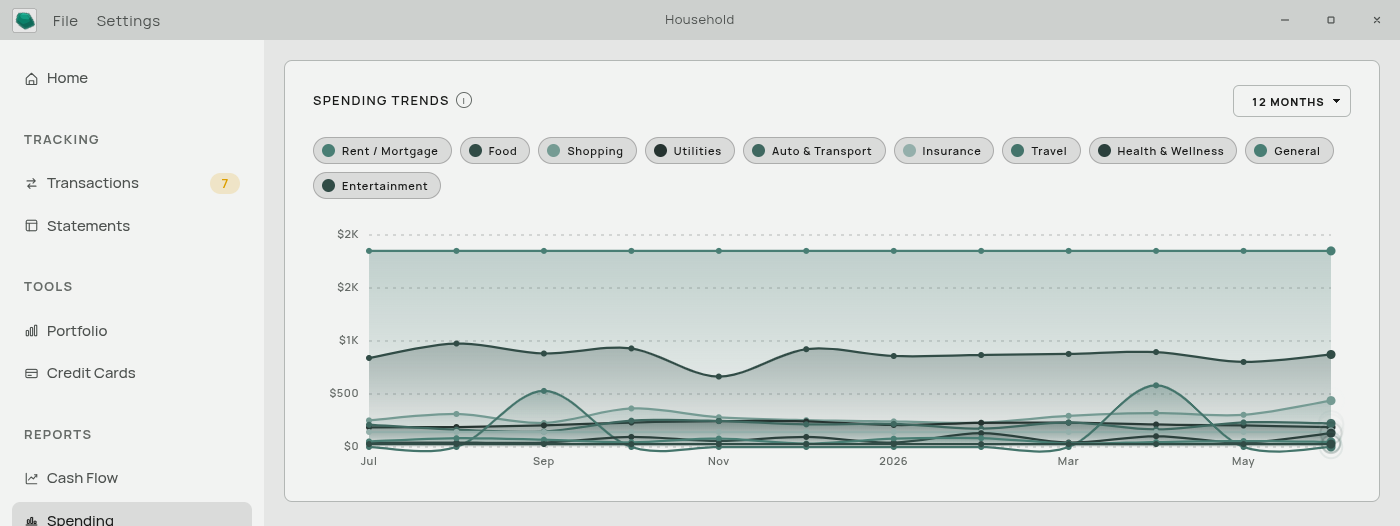
One chart: a line per expense category, showing what you spent in that category each month.
This is the “is this getting worse?” page. A single month tells you nothing; twelve months of the same category tells you whether a habit is drifting.
Controls

Range — 6 Months, 12 Months, 3 Years, or 5 Years. 12 months is the default.
Category buttons above the chart turn each line on and off. Every category starts on. With a lot of categories the chart is a tangle, so turning off all but two or three is the normal way to use it.
Your on/off choices are kept when you change the range. A category you have not seen before — because it only has spending in a longer window — arrives switched on.
Categories are listed biggest-spending first, so the ones worth looking at are at the front.
What it includes
Expense categories only. Income and transfers are not plotted here.
An “Uncategorized” line. Spending with no category gets its own line. If it is one of your bigger lines, your other lines are understating reality — the money is real, it is just not filed anywhere yet.
Only categories with actual spending. A category with nothing in the window is not drawn and gets no button.
What it leaves out
The current month. The window always ends with the last complete month. A month that is a third over would otherwise show as a sharp drop in every category and make the whole chart misleading.
So on 20 July, “12 Months” means July of last year through June of this year.
Reading it
A steadily rising line is a category drifting up.
A saw-tooth line is usually something billed irregularly rather than something out of control.
A line that stops means the category has nothing in the later months — a subscription you cancelled, or transactions you have not imported yet.
A sudden change in level at a particular month often means you re-categorized something rather than changed your behaviour. Recategorizing moves history as well as the present.
If the page is empty
“No spending to chart yet” means no transactions in the window are categorized as expenses. Either you have not imported anything, or nothing has been categorized. See Automatic Categorization.
“Nothing selected” means you have switched every line off.
Related: The Dashboard · Categories · Cash Flow Reports