What Aventurine Is
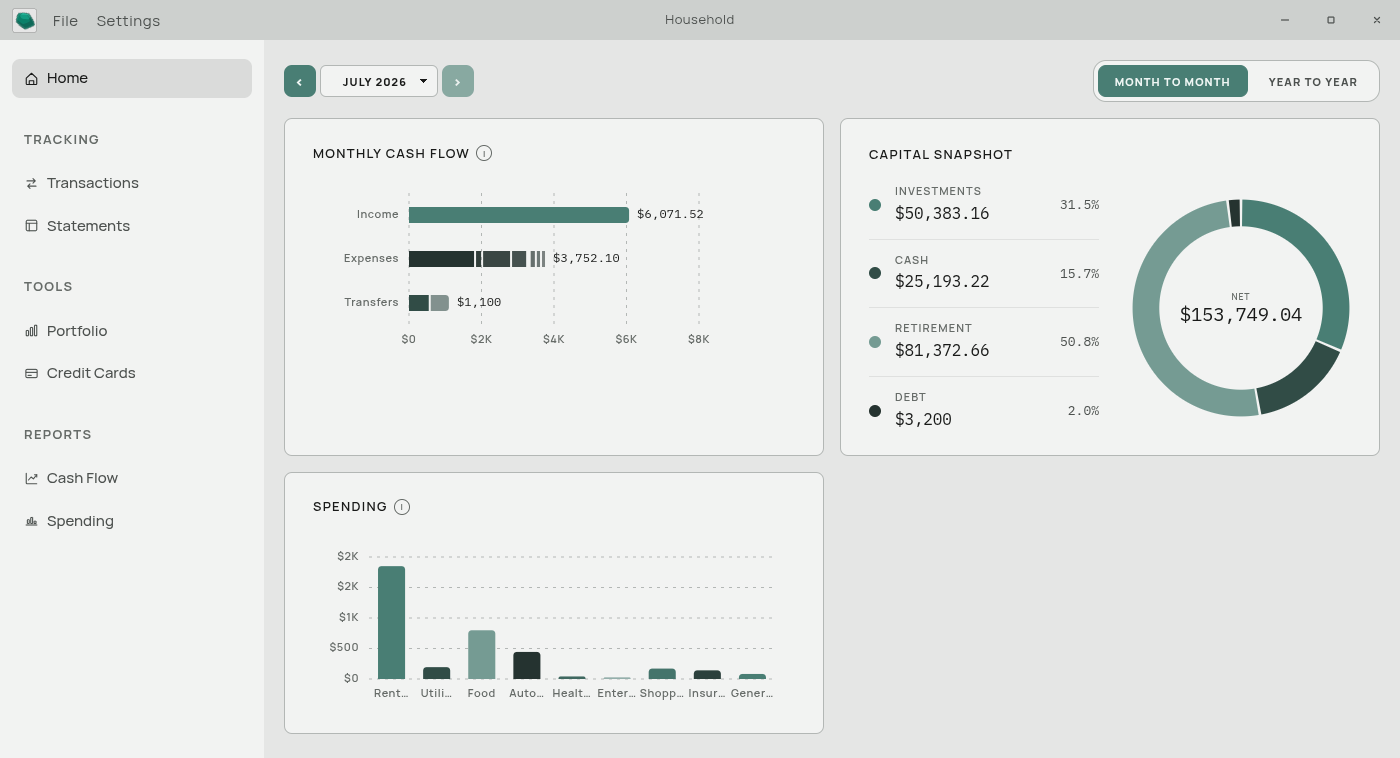
Aventurine is a desktop app for tracking your money. You download transaction files from your bank — the same CSV or Excel export you could already open in a spreadsheet — and Aventurine reads them, sorts the transactions into categories, and builds your statements and charts from them.
It runs on your computer, like a word processor does. It is not a website, and it does not have a server that holds your data.
What it does
Reads your bank’s export files. CSV, Excel, OFX, QFX, QIF, and JSON files all work. Aventurine works out which column is the date, which is the amount, and which is the description. See Supported File Formats.
Sorts transactions into categories automatically. It recognizes thousands of common merchants and can tell that “SQ *BLUE BOTTLE 0231” is a coffee purchase. Anything it is not confident about is left blank for you. See Automatic Categorization.
Learns from your corrections. The first time you tell it that “PYMT TO SUNRISE PROP MGMT” is Rent, it remembers, and every future transaction with that description is filed as Rent without being asked.
Builds statements from your transactions. Your Cash Flow statement fills itself in from the ledger — you do not type numbers into it unless you want to. See Computed and Typed Values.
Charts your money. A dashboard with monthly and yearly views, a diagram tracing income through to each spending category, a spending trend chart, and a forward-looking cash forecast.
Keeps a Balance Sheet. A month-by-month table of what each of your accounts is worth. Imports can fill this in for you when your bank’s export includes a balance column.
Exports everything back out. Any time, in four standard formats. Your data is never trapped.
What it does not do
It does not connect to your bank. There is no linking, no credentials to hand over, no read-only access tokens. You download the file; you give it to the app. This is a deliberate design choice, not a missing feature.
It does not sync between devices. There is no cloud. If you want your data on two computers, you move the file yourself — see Backing Up Your Data.
It does not send anything anywhere. No telemetry, no crash reports, no usage statistics, no update checks. The app works with your network cable unplugged.
It does not have budgets. Aventurine tracks what happened and projects what is coming. It does not ask you to set spending limits per category.
It does not fetch stock prices. The Portfolio is a manual tracker — you type in the market price you want it to use.
How it compares to a spreadsheet
Many people who try Aventurine are coming from a spreadsheet, so the comparison is worth making plainly.
A spreadsheet gives you total freedom and zero help. Every month you paste in rows, write formulas, and re-categorize the same coffee shop for the fifteenth time.
Aventurine gives you slightly less freedom and a great deal of help. The import handles the messy parts of your bank’s file, categories are applied automatically, and the statements compute themselves. Where a spreadsheet would make you choose between “automatic” and “editable”, Aventurine gives you both: any computed number in your Cash Flow statement can be typed over, and clearing your typed value hands the cell back to the automatic calculation. See Computed and Typed Values.
What you keep from the spreadsheet world: the tables behave like a spreadsheet. You can click and drag across cells, copy, paste, and use arrow keys. See Working in the Tables.
Who it suits
It suits you if you want a clear picture of your money without handing your banking details to a third party, and you do not mind downloading a file from your bank once a month.
It suits you less if you want your balances to update by themselves the moment you tap your card. Aventurine is deliberately a once-a-month app. See The Monthly Routine.
Next: Installing Aventurine