The Credit Cards Page
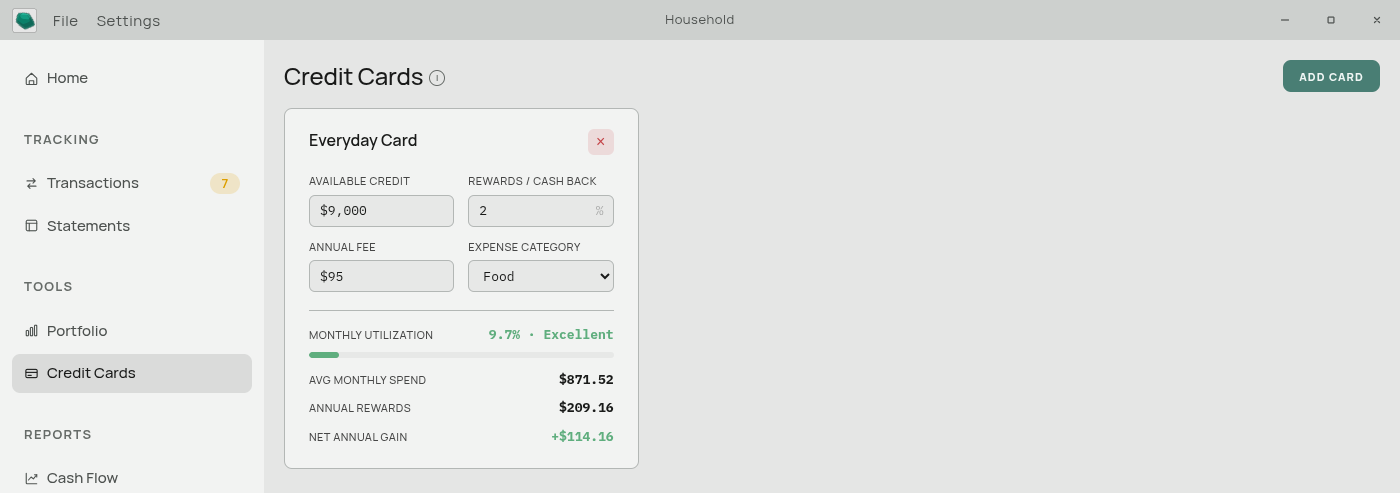
A planner for comparing credit cards against your actual spending. It answers questions like “would this card’s rewards cover its annual fee?” and “how much of my limit am I using?”.
This page is a calculator, not a tracker. It does not know your card balance, it does not know what you owe, and it is not connected to the transactions on your credit card. It uses your own spending in a category you choose as a stand-in for what you would put on that card.
Adding a card
Add Card creates a card. Click its name to rename it. The × on the card removes it after a confirmation.
What you enter
Available credit — the card’s limit.
Rewards % — the cash-back or points rate, as a percentage. Enter 2 for 2%.
Annual fee — what the card costs per year. Enter 0 for a free card.
Category — an expense category from your own list. This is the important one: the app takes your average monthly spending in that category and treats it as what would go on this card.
Pick the category that matches how you would use the card. A groceries-rewards card should point at Food. A travel card at Travel. If you would put everything on it, point it at your largest category and read the result as a floor rather than a total.
Everything saves as you type. Changing the category recalculates instantly.
What it works out
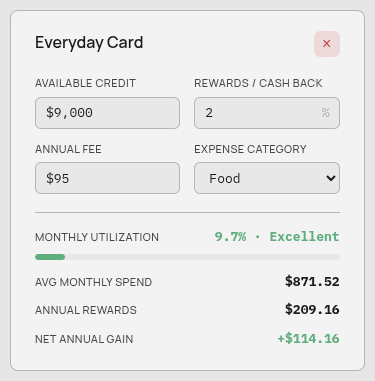
Avg monthly spend — your average monthly spending in the linked category.
The average uses the most recent twelve months that actually have spending in them. Months with nothing recorded are skipped rather than averaged in as zeros, so a category you only started tracking recently is not dragged down by the empty months before it.
Monthly utilization — average monthly spend ÷ available credit, colour-coded against the usual credit-building guidance:
| Utilization | Reads as |
|---|---|
| Up to 15% | Excellent |
| Up to 30% | Good |
| Up to 50% | High |
| Above 50% | Very High |
Annual rewards — average monthly spend × 12 × rewards %.
Net annual gain — annual rewards minus the annual fee. Negative means the card costs you more than it returns at your current spending.
Reading the result
Net annual gain is the number to compare between cards. A card with a $95 fee and 4% back can beat a free card with 1.5% back — or not — and the difference is entirely down to how much you actually spend in that category. That is why the calculation is tied to your own history rather than to a figure you guess.
Utilization is a separate concern from rewards. It matters for your credit score, not your wallet.
Prompts you may see
- “Pick an expense category to see utilization and rewards.” — no category linked yet.
- “Enter the card’s available credit to see utilization.” — utilization needs a limit to divide by. Rewards still calculate without one.
Where the spending figure comes from
The average is read from your Cash Flow statement, which follows the same rule as everywhere else: each month’s figure is calculated from your transactions unless you typed over that cell. See Computed and Typed Values.
Deleting a category that a card is linked to does not block the delete. The card simply loses its link and its derived numbers go blank until you pick a new category.
Related: Categories · Computed and Typed Values